Real data. Measured Runs. Careful review.
Track and review · Lesson 12 · Plan about 30 min
By the end of this lesson
- Navigate an actual Run and distinguish saved-source inspection from execution.
- Interpret equal measured scores without inferring identical models or generalization.
- Recognize stale source evidence and the Restricted Mode boundary.
Watch the lesson
English · 6:22 · Recorded with Apizr 0.4.6 development candidate.
Chapters in this recording
| Time | Chapter |
|---|---|
| 00:00 | Review real experiment Runs in VS Code |
| 00:24 | Source, execution, review |
| 00:57 | Connect an explicitly selected engine |
| 01:45 | Inspect saved source without fitting the model |
| 02:38 | Read the Run and its recorded source |
| 03:30 | Compare depth 1 as A with depth 3 as B |
| 04:30 | Restricted Mode refuses project operations |
| 05:05 | Equal scores: what can you conclude? |
| 05:29 | A measured tie is a starting point |
| 06:06 | Continue with the written Wine guide |
Read the recording transcript and commands
This is the retained English narration, in the original chapter order. Commands keep the recorded version and prerequisites; setup additions in the lesson are labelled separately.
00:00 — Review real experiment Runs in VS Code
Can we explain a better score from the evidence we actually retained? In this lesson, we review decision trees trained on the public Wine dataset. You will connect Apizr to an installed Python environment, inspect saved source, and compare measured Runs inside Visual Studio Code. The goal is a defensible experiment review, with the limits still visible.
00:24 — Source, execution, review
Keep three things separate. The source defines a training procedure. A Python session or a real Jupyter kernel executes it and records a Run. The extension reads that retained history through your selected engine and operator policy. Our dataset has one hundred and seventy eight samples, thirteen chemical measurements, and three cultivar classes. We use a fixed stratified seventy thirty split and seed forty two. The written guide contains the reproducible setup.
00:57 — Connect an explicitly selected engine
This is the installed development extension in a dedicated Wine workspace. The example environment already contains Apizr and scikit learn. Here, Python mode points to that environment, and the operator policy allows source analysis and history reading. Run Check engine to verify the selected executable. Then open the experiment dashboard and explicitly refresh history. We have three completed Runs: two SDK sessions and one real notebook execution. Your Run digests and timestamps will differ. The extension can also offer a managed CLI installation; that does not install your scientific environment.
01:45 — Inspect saved source without fitting the model
Open the Python experiment and run Inspect with Apizr. The result describes saved source; inspection does not fit a decision tree. The code records the Wine input identity, tree depth, seed, and computed metrics. Expand the Inspection view to read the evidence and source locations. Now add an unsaved comment. The view marks the previous evidence outdated. Inspecting again still reads the saved file and excludes those live edits. Revert the comment and inspect the saved file again. A current source view is useful context, but it does not recreate an earlier execution.
02:38 — Read the Run and its recorded source
Return to the dashboard and select the depth three SDK Run. Its accuracy is zero point nine six three zero, and macro F one is zero point nine six three eight. Those values were computed on the held out split and rounded before logging. Read the capture mode and recorded parameters alongside the metrics. Open the complete JSON when you need the canonical Plan and Run. Open recorded source navigates to the current file, so compare source identity before treating it as the exact historical bytes. The notebook Run was produced by a real kernel. Notebook inspection alone does not execute its cells.
03:30 — Compare depth 1 as A with depth 3 as B
Choose Compare two Runs. Use the depth one SDK Run as A, then depth three as B. Read the canonical comparison. The observed depth changes from one to three, while the retained Wine input identity matches. Accuracy changes from zero point six one one one to zero point nine six three zero. The displayed delta is B minus A. Macro F one also improves on this split. Reverse the order and the delta changes sign. These are observations from these two executions. A matching logged input does not establish every runtime condition, and unknown evidence stays unknown.
04:30 — Restricted Mode refuses project operations
This second dedicated profile opens the same example in Restricted Mode. The extension can show its dashboard, but project operations are disabled. Try Check engine: the command reports workspace untrusted and starts no engine. Trust is an explicit decision about code you have reviewed. The operator policy remains a separate permission boundary after trust. In a trusted workspace, reading history and inspecting saved source still do not execute your experiment.
05:05 — Equal scores: what can you conclude?
Pause here. The depth three SDK Run and the depth five Jupyter Run have the same accuracy and macro F one. Does that establish equal generalization? What would you check before preferring either model? Then repeat the notebook cell and predict what changes in history.
05:29 — A measured tie is a starting point
Equal rounded scores on one split establish a tie for those logged metrics here. They do not establish equal predictions, equal performance on new data, or a deployment decision. Check the retained parameters, input identity, capture details, and missing evidence, then evaluate further. Repeating the notebook cell produces a new Run and execution count. With this fixed procedure, the scores may repeat. Keep that new execution distinct. Connect explicitly, inspect saved source, and compare the evidence that was actually recorded.
06:06 — Continue with the written Wine guide
Follow the written Wine lesson for commands, dependencies and the notebook. The Apizr and extension repositories contain the example and current limits. Thank you for following Apizr Academy.
Train two decision trees on the UCI Wine dataset, then review their measured results in Apizr for VS Code. The dataset contains 178 real wine samples, 13 chemical measurements and three cultivar classes; it is bundled with scikit-learn. Credit: S. Aeberhard and M. Forina, Wine (1992), CC BY 4.0.
The images show the actual 0.4.6 development extension and locally executed Runs.
1. Prepare the example
Use a checkout of Apizr's 0.4.6 development branch, Python 3.14, uv and the
development VSIX. From the repository root, copy the
example into a fresh directory:
cp -R examples/tracking/wine-vscode /tmp/apizr-wine
uv venv /tmp/apizr-wine/.venv --python 3.14
uv pip install --python /tmp/apizr-wine/.venv/bin/python \
  '.[notebook]' -r /tmp/apizr-wine/requirements.txt
cd /tmp/apizr-wine
.venv/bin/apizr init .
.venv/bin/python wine_experiments.py
This installs the selected development checkout. The scientific dependencies belong to the example's environment, independently of the extension's managed CLI.
The script exports the dataset to wine.csv, uses the same stratified 70/30 split
and seed 42, and executes trees with max_depth=1 and max_depth=3. Each SDK
session records the input's content identity, the two parameters and the computed
accuracy and macro F1, rounded to four decimal places before logging.
2. Connect the extension
The policy created by init allows source inspection. Add read access to this
project's history and select the example's Python environment:
.venv/bin/python - <<'PY'
import json
from pathlib import Path

root = Path.cwd().resolve()
policy = root / ".apizr/operator.json"
document = json.loads(policy.read_text())
document["grants"].append({
    "adapter": "experiments", "operation": "history.read",
    "target": {"kind": "local", "root": str(root)},
    "store": ".apizr/experiments/v1", "permissions": ["experiments.read"],
})
policy.write_text(json.dumps(document, indent=2) + "\n")
(root / ".vscode").mkdir(exist_ok=True)
(root / ".vscode/settings.json").write_text(json.dumps({
    "apizr.engine.mode": "python",
    "apizr.engine.python": str(root / ".venv/bin/python"),
    "apizr.operatorPolicy": str(policy),
}, indent=2) + "\n")
PY
code .
Trust this example folder, then run Apizr: Check engine. Open the Apizr bee, choose Open experiment dashboard, then Refresh history. Opening the view alone does not start an engine or load the store.
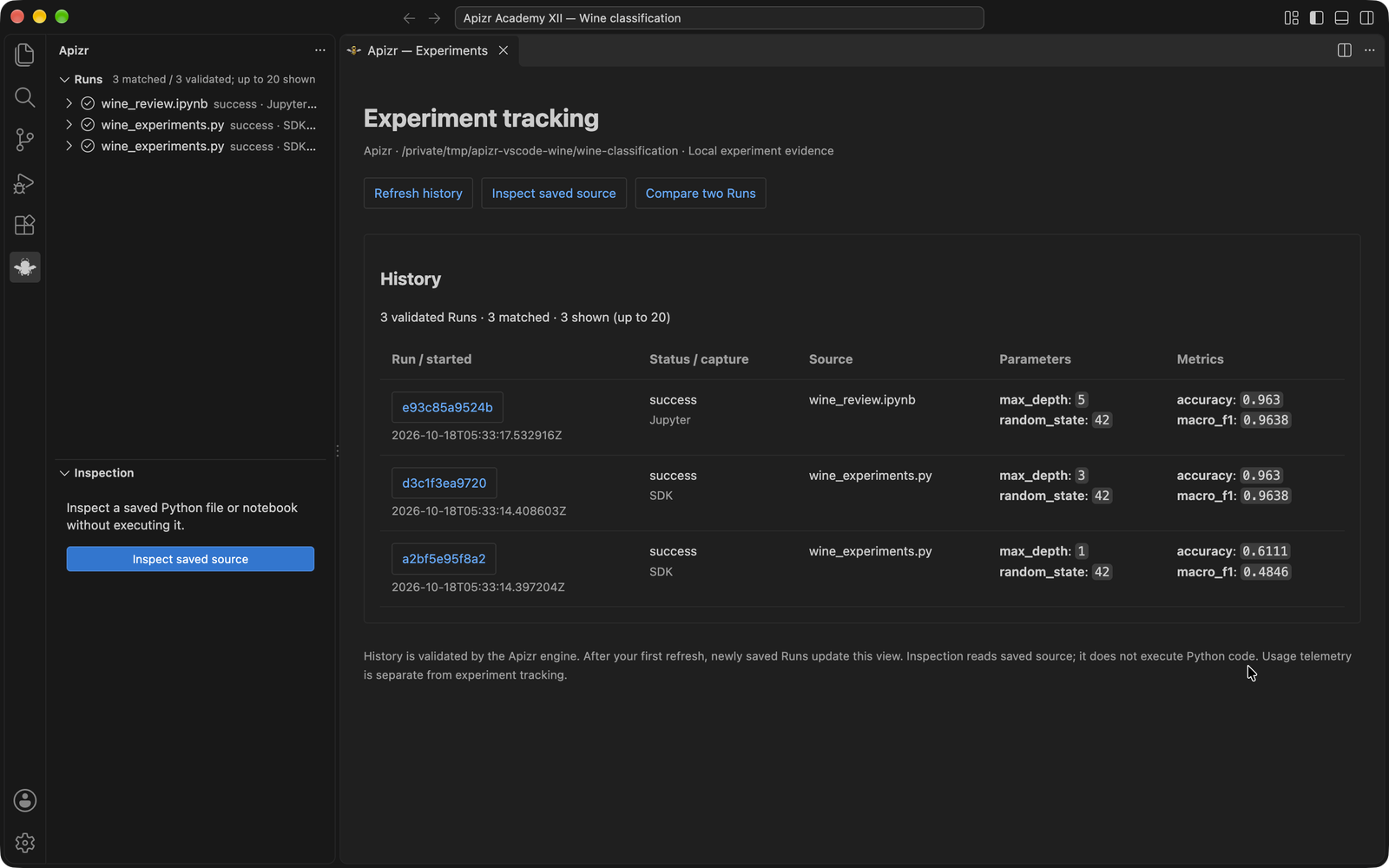
The captured session contains the two SDK Runs plus a real Jupyter Run from step 5. Run identities and timestamps will differ in your own session.
3. Read a Run
Select a Run's digest in the dashboard. Read its capture mode, max_depth,
random_state, accuracy and macro_f1. Open complete JSON preserves the
canonical Plan and Run, including input fingerprints and unknown evidence.
Open recorded source opens the current source file.
This short GIF sequences captured views of the running extension:
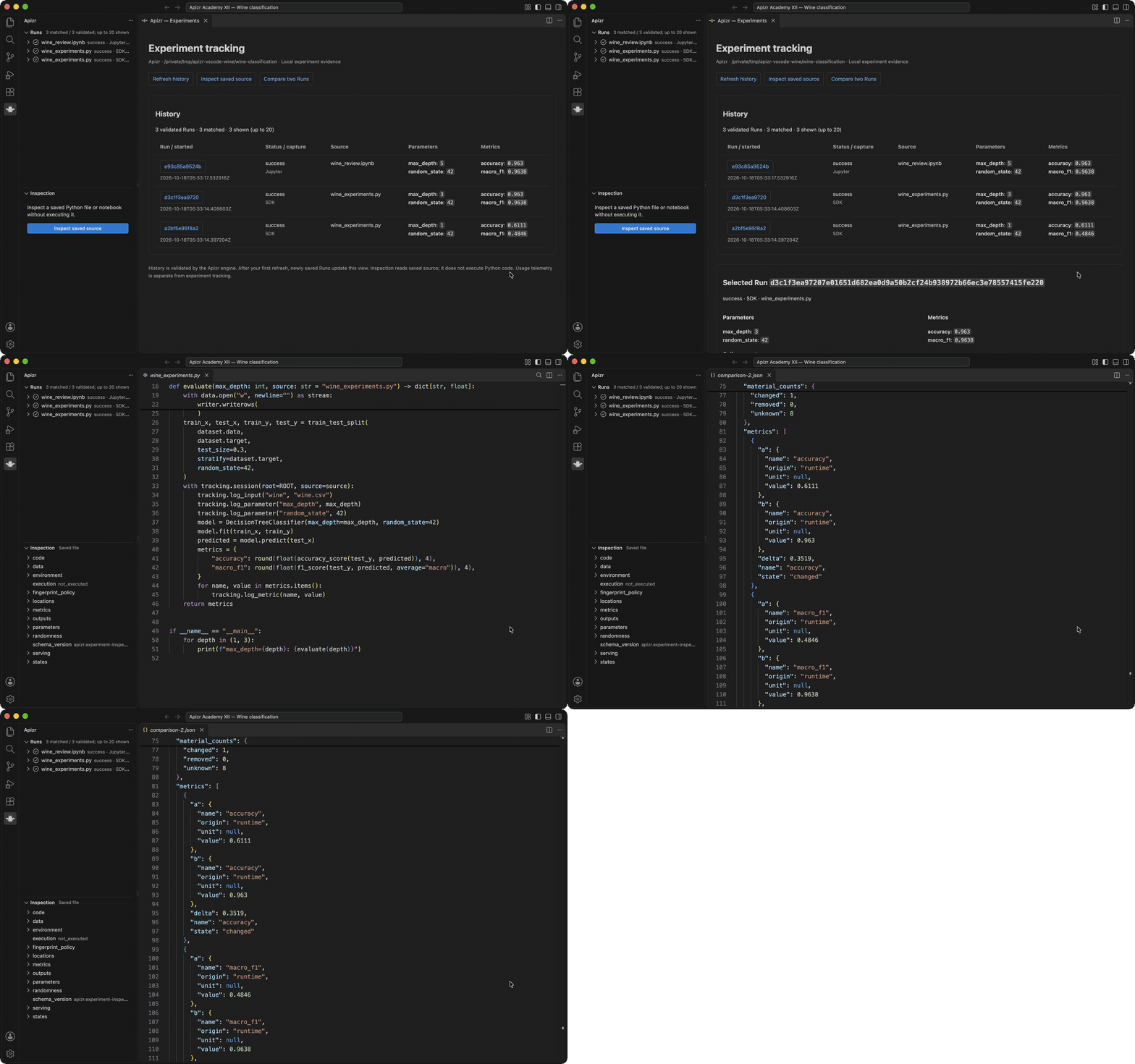
In the captured execution:
| Capture | max_depth |
Accuracy | Macro F1 |
|---|---|---|---|
| SDK | 1 | 0.6111 | 0.4846 |
| SDK | 3 | 0.9630 | 0.9638 |
| Jupyter | 5 | 0.9630 | 0.9638 |
This Wine example records the selected input, parameters and metrics; it does not select a saved model artifact. A model fingerprint is therefore not available from these Runs merely because they contain scores.
These are observations on one held-out split. Depths 3 and 5 give the same scores here. This comparison does not establish performance on another dataset or approve a deployment.
4. Inspect and compare
Open wine_experiments.py and choose Apizr: Inspect with Apizr. Expand the
Inspection view to follow the engine's evidence and source locations.
Inspection reads saved source; it does not fit a model. Editing the file marks
that evidence outdated until you explicitly inspect the saved file again.
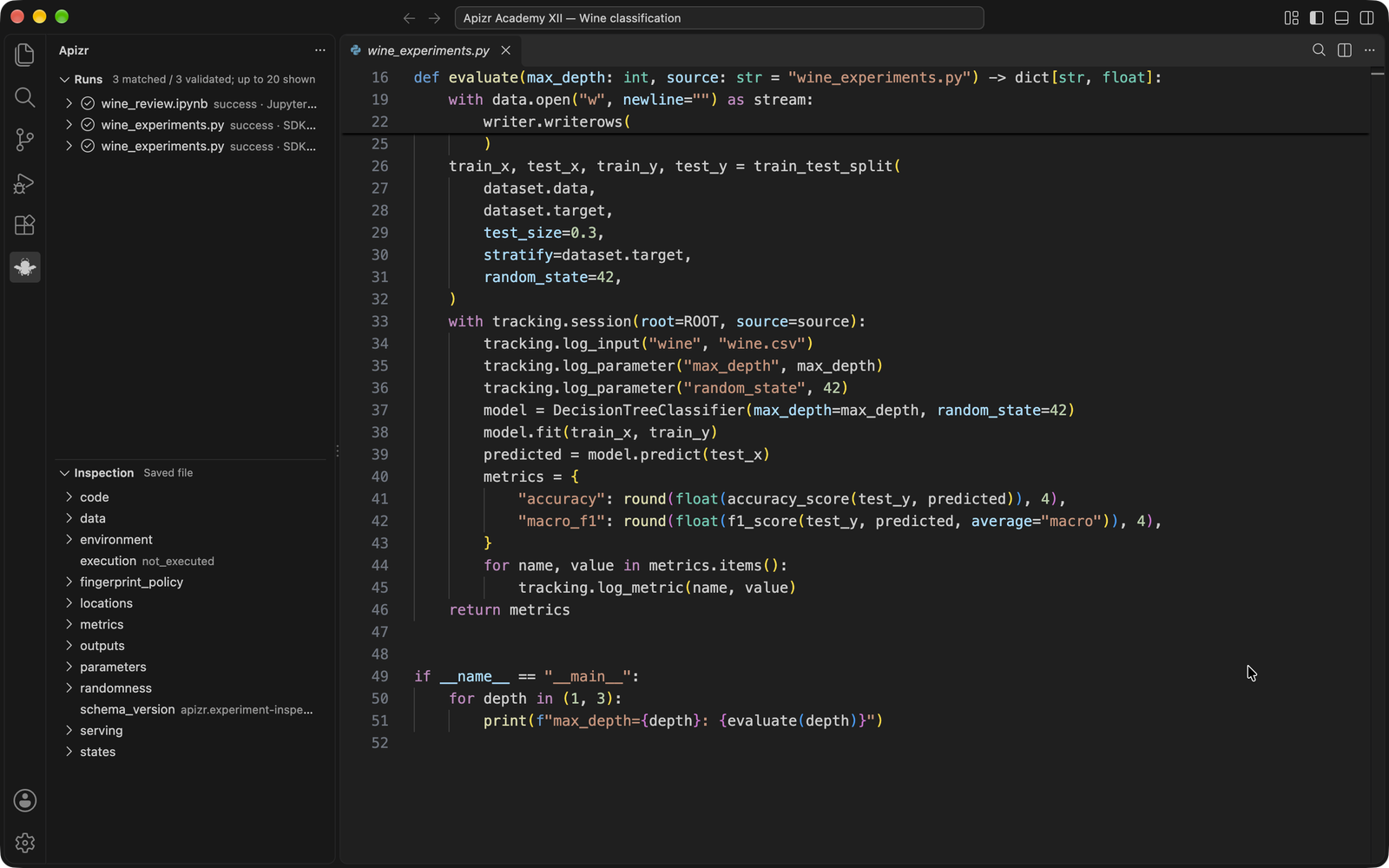
Choose Compare two Runs, selecting the depth-1 SDK Run as A and the depth-3 SDK Run as B. Read the observed parameter change, the Wine input identity and the metric deltas in the canonical comparison. Reverse A and B to reverse the deltas. Unknown evidence remains unknown.
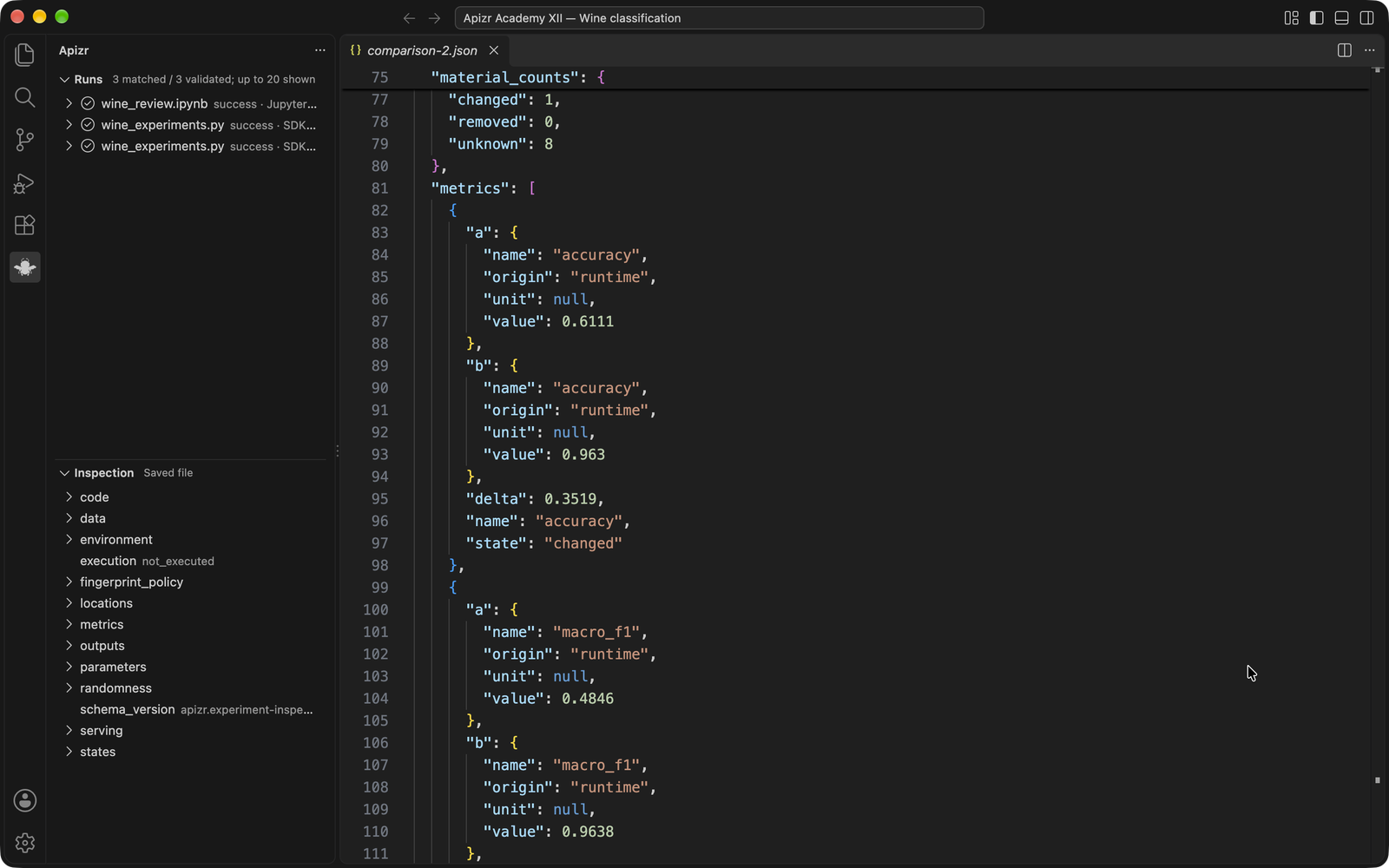
5. Add a real notebook Run
Open wine_review.ipynb in a Jupyter-capable editor, select the example's .venv
kernel and execute its two code cells. The last cell fits the depth-5 tree and
logs its measured scores through the same function and history store. Refresh
history to see its Jupyter capture mode alongside the SDK Runs.
Apizr does not install or replace a notebook kernel. Its notebook-toolbar inspection action reads the saved notebook without executing any cells. A cell identity and execution count do not describe every value in live kernel memory; continue with the Jupyter tracking lesson for that distinction.
Try it: repeat the depth-5 cell. Confirm that another Run appears with a new identity and execution count. Compare its scores and retained input identity with the previous execution before drawing a conclusion.
Extension settings and limits · Tracking guide · Example source
Restricted Mode in the recording
At 04:30, a second dedicated profile opens the Wine workspace in Restricted Mode. The dashboard can be shown, but Check engine reports workspace_untrusted and starts no engine. This is a distinct refusal from a stale saved-source view. In manual practice, use a separate untrusted window/profile to observe it, then make any trust decision explicitly. The operator policy remains a separate boundary after workspace trust.
Practice: explain the comparison
- Use the video’s pause question at 05:05: the SDK depth-3 and Jupyter depth-5 Runs have equal rounded scores. Does that establish equal generalization? What would you check before preferring either model?
- Use Open complete JSON to read the actual input identities, parameters, capture details and missing evidence. If no model artifact was explicitly selected, do not invent a recorded model identity from the score. Repeat the notebook cell and inspect the new Run and execution count.
- Add an unsaved comment, as in the recording, and observe the stale-result indication. Inspect again and check that it still reads the saved file; then revert the comment. Explain why refreshing the history is a read operation and does not rerun training.
Check your reasoning
Equal rounded accuracy and macro F1 on this one held-out split do not establish identical model bytes or equivalent generalization. Read the actual input identities, parameters, capture details and evaluation setup. A model identity remains unknown when no model artifact was selected.
A history refresh reads retained records. It does not retrain, replace an old Run or silently prove that the current file is its recorded source. Read the stale-evidence explanation before choosing the next operation.